LAAS Exam Engine Android app : View Lessons

Share

Learning and Assessment Software (LAAS) is a online learning tools for students, institutes, and organizations. The LAAS Software combines the author engine, content engine, exam engine in to one to create centralized question database and lessons which can be populated and edited by various authors. Assessment and learning engine can be used by candidates to login and take exams, or to import the lessons and learn. LAAS also includes collab engine which uses Jitsi Collab Software to allow administrators to start a video conference meeting with all the students.

The learning module is basically a course delivery engine that provides course content to the candidates. Several types of content is supported, including multimendia,text,PDF,.DOC etc.

The content delivery supports both desktop and mobile devices. One may download whichever software is required from the website.

Learn Soft – Learning and Assessment Software

Content engine features

  1. View lessons organized into topics and subtopics.
  2. Lesson types may include Remote URL, text, html, images, document files (.doc,.docx,.xls,.ppt)
  3. Lesson types may include pdf files, video, audio, YouTube videos and many more
  4. Boomark lessons to view later
  5. Already read lessons are highlighted.

View Lessons: This option allows the user to view lessons already present in learning and assessment engine. Lessons can be reset the lesson to default state (not read), bookmarked for later.

1. To start viewing a lesson tap on “View” button next to lesson title.

Next screen will list all the lessons added arranged in levels you can tap on any lesson title to view lesson.

List of lessons

URL type lesson.
Video type lesson

You can bookmark any lesson by long press on lesson title.

Any lesson read will be marked in blue and bookmarked lessons will be marked in bold.

Options are provided to clear all the bookmarks and reset all the lessons to default un read state.

For additional info of content engine and exam engine for android visit here

LAAS Exam Engine Android app help

CCNP ENCOR Exam Sim Android / iOS / macOS Apps

Share

Simulationexams.com offers CCNP ENCOR Exam Simulator for Android/ios/macOS apps. The products come in two versions, 1. free version, limited to 60 questions, and 2. full version with 200+ questions with flashcard explanation.

CCNP (Implementing and Operating Cisco Enterprise Network Core Technologies) 350-401 ENCOR : is the core exam that focuses on candidates knowledge on enterprise infrastructure including dual-stack (IPv4 and IPv6) architecture, virtualization, infrastructure, network assurance, security, and automation.

Question types supported are

  • Multiple choice single answer
  • Multiple choice multiple answer
  • Text Drag and drop
  • Image Drag and drop

Topics covered include

  1. Architecture 15%
  2. Virtualization 10%
  3. Infrastructure 30%
  4. Network Assuranc1e 10%
  5. Security 20%
  6. Automation 15%

Please check below for downloading the required apps

CCNP ENCOR Exam Sim mac OS app

CCNP ENCOR Practice Test iOS app

CCNP ENCOR Practice Exam android app

Also check this for CCNP ENCOR Exam Sim windows version

Juniper JNCIA Certification practice Test Mobile apps

Share

Simulationexams.com has recently updated its Juniper JNCIA Certification practice Test for Mobile devices. The software is available in both trial version (limited to 60 questions) and full version (250+ questions).

Question types supported are

  1. Multiple choice single answer
  2. Multiple choice multiple answer
  3. Exhibit Type

Complete explanation is provided for each question in Learn mode, and actual exam environment is simulated in Exam mode. Options to save the results and reviewing questions are provided.

Links to iOS apps:

JNCIA Exam Simulator – Free App: Download App From App Store

JNCIA Exam Simulator – Full App: Download App From App Store

Links to Android apps

JNCIA Exam Simulator – Free App :Download App From App Store

JNCIA Exam Simulator – Full App :Download App From App Store

Also check this for JNCIA windows application

Tutorial for Network+ Protocols and standards

Share

A tutorial on Network+ is available from simulationexams.com. A brief review of contents of the tutorial are given below:

1.0 Media and Topologies

a. Network Elements
b. Physical Topologies
c. Physical Media
d. Network Connectivity Devices
e. WAN Devices

2.0 Protocols and standards

a. Layers of OSI
b. MAC addressing
c. Purpose of subnetting
d. Difference between public and private networks
e. Protocol
f. Network Utilities

3.0 Network Implementation

a. Basic Capabilities of Network Operating System (NOS)
b. Firewall
c. Proxy servers
d. VLANs
e. Benefits of Using Antivirus software
f. Fault tolerance
g. Disaster recovery

4.0 Network Support

a. Troubleshooting scenario
b. The Troubleshooter’s Resources
c. Manufacturers Troubleshooting Resources
d. Hardware Network Troubleshooting Tools
e. Software Troubleshooting Tools

Downloadable practice tests for Network+ are also available from simulationexams.com

swregn.com Network+ Exam Sim for iOS iPhone

Share

 swregn.com, a software registration and download site, published Network+ for iOS and iPad. The app consists of 300+ most relevant questions with answers. The following are some important features.
1. Compatible with most of the mobile devices including iphones and iPads
2. Abundant features include night mode and full screen modes.
3. Updated to the latest Network + N10-008 syllabus.
4. Complete explanation is provided for each question in Learn mode, and actual exam environment is simulated in Exam mode. Options to save the results and reviewing questions are provided.

You may visit the product page here:
https://www.swregn.com/Products/Exam-Simulator-NetworkPlus.html

The product page shows that the software is available on Android and iOS mobile devices as well as Windows desktop computers.

The built in feedback mechanism allows a user to send question feedback online, without leaving the exam environment. There is provision to take only bookmarked questions or the wrongly answered questions.

The practice tests are available in demo mode and the full version may be purchased online. 

Other products that may be available include the following:

CCNA Practice tests
A+ Core 1 practice tests
A+ Core 2 practice tests

Security+ practice tests

CBT Exam Engine For Android Mobiles

Share

Computer Based Test (CBT) Software: The Computer Based Test Software includes an Author module that can be used to create a centralized question database which can be populated and edited by various Authors, and Exam Engine module that can be used by candidates to login and take exams.

The Exam Engine works in conjunction with author module. The author module enables inputting the required questions and answers by the author(s). The detailed help provides step-by-step procedure on using the author module and the test engine. The exam engine allows a candidate to take the test.

Important features of Exam Engine Android

Modes
Exam mode : Simulates actual exam environment in which candidate needs to answer exam created by instructor in a given time without any help from flash cards.
Learn mode : Provides interactive learning environment where candidate can go through each question and view flash cards and correct answers for each question.
Review mode : At end of every exam (learn/exam) mode you can save results for that exam for future viewing. In review mode you can view saved exams with answers selected by candidate along with correct answer and detailed explanation for each question (if provided by author).

Display features

Read modes (Day/Night modes): Exam screen display setting can be changed between Day Mode (black text on white background) and Night Mode (white text on black background) to help you read according to your convenience.

Supported Question Types

Multiple choice single answer (MCQA) and Multi Answer (MCMA)

Please visit this link to download the CBT Exam Engine Android app

https://play.google.com/store/apps/details?id=com.anandsoft.cbtexamengine

Some screenshots of android app

Also check out this for CBT Exam Engine for windows

https://www.simexams.com/products/cbt-exam-engine.htm

Swregn.com Network+ Labsim Update

Share

Lab simulator for Network+ provides detailed labs for candidates to get hands on experience before taking exam.

Lab Simulator Features:

  1. Include 100+ practice Lab exercises
  2. Configure Wireless Access Point, DHCP Server, and Switches.
  3. Supports short form commands, and tab in IOS simulator.
  4. Lab manual with detailed steps for each lab exercise
  5. The demo version is limited to a fewer labs.

Recently, a few more labs are added to the Lab Simulator includes

  1. Identifying Security threat features ( such as Malware , Spyware etc.)
  2. Identifying Network Devices ( such as HVAC, loT etc.)
  3. Identifying the network characteristics managed by QoS (such as Bandwidth, Jitter etc.)
  4. Identify the features of various virtualization concepts (such as vNIC, Hypervisor etc.)
  5. Identify the features of various troubleshooting tools (OTDR, Cable Tester etc.)
    Identify and compare cloud service models (such as SaaS, PaaS etc.)
  6. Identifying Different APC Connector Types
  7. Identifying Ipv6 address Type
  8. Matching the Wi-Fi Standards with speed and frequency bands

Check this out  for Network+ Exam Simulator

Check out the following URL for complete list of labs available for practice:

Lab sim for Network+ available labs

ExamGuides Lab Sim for A+ update

Share

ExamGuides is the best site that offers cram notes and lab simulators based on the new objectives of CompTIA A+ certification. Lab Simulator provides detailed labs with help files for candidates to get hands-on experience before taking the exam. The important features of A+ LabSim are given below:

Lab sim Features

  1. Include 100+ practice Lab exercises
  2. Lab manual with detailed steps for each lab exercise
  3. Detailed help files that provide step by step instructions on using the simulator have been provided.
  4. The demo version is limited to a fewer labs.

Several new features such as

  1. Ability to enable/disable navigation buttons
  2. Administrator login for lab profiles configuration
  3. Saving and reloading half completed labs
  4. Resetting individual and all labs to default
  5. Marking not attempted, not completed , completed labs in different color for easy identification.
  6. Bookmarking individual labs.
  7. Bookmarking all labs under selected section
  8. Take Backup/Restore of lab progress.

You may also interested in the practice test for CompTIA A+ certifications. Please click on the CompTIA A+ Practice tests to download.

About ExamGuides.com: ExamGuides is one the best website provides online training for the certifications like CompTIA A+, Network+, Security+, Server+ and others. Here you find exam cram notes for a quick review of concepts, required for taking any certification exam.

About CompTIA A+ Certification: A+ Certification, awarded by CompTIA® organization is the most widely recognized certification in the area of PC hardware and software technologies. To attain A+ certification, one needs to pass 220–1001 and220–1002. These exams basically test the skills in assembling a computer, troubleshooting, and the ability to work with various operating systems.

Disclaimer: Examguides.com is not associated or affiliated with CompTIA® or any other company. All trademarks are duly acknowledged. A+™ is the trademark of the CompTIA organization and is duly acknowledged.

Computer Based Test (CBT) Software

Share

The Computer Based Test Software combines the CBT Author and CBT Exam Engine modules to create centralized question database which can be populated and edited by various Authors. CBT Exam Engine can be used by candidates to login and take exams.

Important features of the CBT (Computer Based Test) software

  1. Authoring by multiple authors for fast turnaround time.
  2. Support for major question types asked in computer based exams. Also supports multimedia in questions.
  3. Support for multiple platforms like Windows/iOS/Android and Mac.
  4. Run from your own server for Enterprise edition.
  5. Upload bulk questions and candidate details.
  6. Set exam environment for each exam.
  7. Remotely proctor online exams with live image capturing, and geolocation tracking.
  8. Exam result reports include scorecards, time analysis, and topic wise analysis.
  9. Results can be saved to docs/pdfs or printed.
  10. Customize app to use institute logo.
  11. Excellent support service.

CBT exam software consists of two main constituent modules

CBT Software-Author Module is used to input questions into the exam database. Later the exam database is imported into the CBT Software- Exam Engine and used by the instructor to administrate the exam. The Author module is free to download and use. For additional info check here features of author module

CBT Software-Exam Engine can be used by instructors to present candidates with Computer Based Test using their own Question Database created using CBT Software Author Module. For additional info check here features of Exam Engine

Network+ Exam Sim Mobile apps

Share

Simulationexams.com has recently updated its Network+ exam simulator for Mobile devices. The software is available in both trial version (limited to 60 questions) and full version (375+ questions).

Question types supported are

  1. Multiple choice single answer
  2. Multiple choice multiple answer
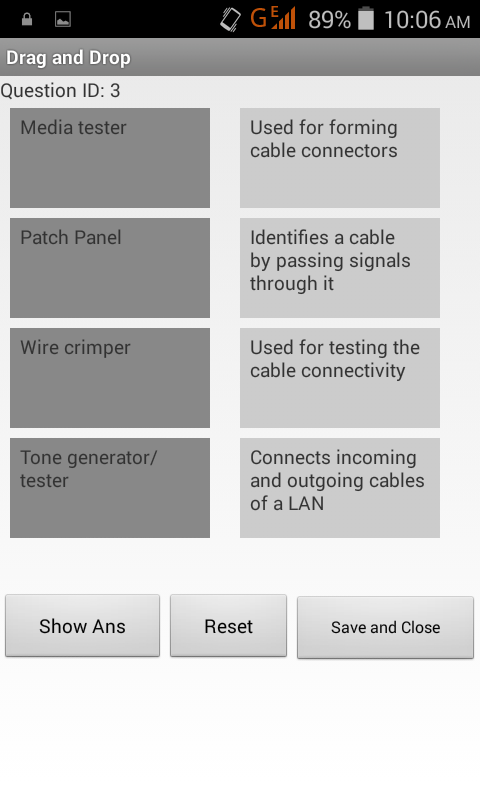
  3. Drag and drop
  4. Exhibit type

Complete explanation is provided for each question in Learn mode, and actual exam environment is simulated in Exam mode. Options to save the results and reviewing questions are provided.

Links to iOS apps:

Network+ Exam Simulator – Free App :Download Free App From App Store

Network+ Exam Simulator – Full App :Download App From App Store

Links to Android apps

Network+ Exam Simulator – Free App :Download Free App From Play Store

Network+ Exam Simulator – Full App :Download App From Play Store