SimExam Exam Engine on the App Store

Share

The Computer Based Test Software combines the CBT Author and CBT Exam Engine modules to create centralized question database which can be populated and edited by various Authors. CBT Exam Engine can be used by candidates to login and take exams.

SimExams CBT software’s exam engine module is available for iphones too so the candidates can take exams from their mobile phones. iOS application of exam engine is available for download from App Store.

Exam Screen with MCMA question type

Download CBT Exam Engine For iOS and experience it on your iPhone, iPad and iPod touch.

Computer Based Test Software Author Module : Export Questions To Excel File

Share

The Computer Based Test Software includes an Author module that can be used to create a centralized question database which can be populated and edited by various Authors, and Exam Engine module that can be used by candidates to login and take exams.

CBT Software-Author Module is used to input questions into the exam database. Later the exam database is imported into the CBT Software- Exam Engine and used by the instructor to administrate the exam.

Simexams.com updated it’s Computer Based Test software Author Engine to support following features.

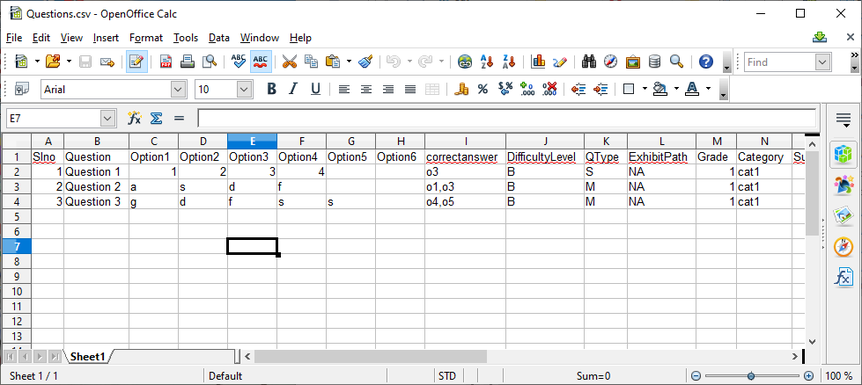
  1. Bulk uploading of questions. To enter questions in bulk by using a excel file.
  2. Bulk uploading of student information. To enter candidate details in bulk by using a excel file.
  3. Full backup of their work on CBT Software. This option will create and download a full backup file (.zip format) containing all details for all exams, candidates, groups.
  4. To restore their work from a previous back up file.

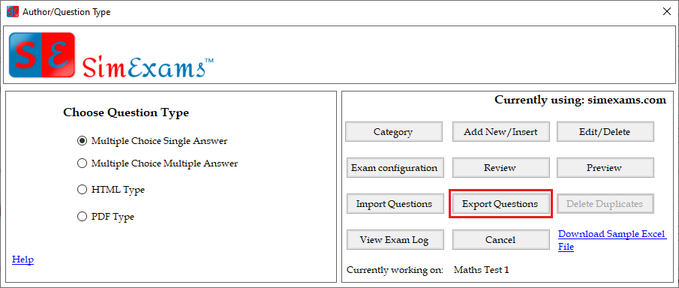
Export questions to Excel file: This feature can be used by Administrator and Authors to export existing questions to a excel file format. Authors will be able to export only the questions they have entered, where as administrator will have option to select the author whose questions he wants to export.

The main purpose of this feature is to give all authors ability to take a copy of all the work they have done on CBT Author.

Author question Type window

Sample exported excel file

CompTIA Security+ Practice Tests For Mobile Devices

Share

CompTIA Security+ certification is designed to validate the candidate knowledge of security-related topics including troubleshooting, detect, manage the security threats. If you pass out the security+ exam then you will definitely get a better job in the IT field. Passing the exam has been a tough task because of some tricky concepts involved in the syllabus. To overcome the problem simulationexams.com has updated it’s android and ios app practice tests for CompTIA Security+ to understand the topics with the latest questions of security+.

The practice tests are prepared by subject matters experts. With the help of Security+ android app, you can prepare for the exam within the shortest possible span and will be able to score high scoring grades. The practice tests come with demo version (which as 60 practice questions)and the full version (which has 250+ practice questions). The question types include multiple-choice questions, drag-n-drop and exhibit based. The practice tests are useful for candidates who have planned to take the certification exam in the next couple of weeks, or for those who would like to know their proficiency in a given area.

About SimulationExams: The website, a brand site of Anand Software and Training, offers practice tests for various certification exams including Cisco CCNA™, CompTIA A+™, Network+™, Juniper JNCIA™, and others.

Disclaimer: Simulationexams.com is neither associated nor affiliated with CompTIA® or any other company. A+™, Network+™, Security+™, Server+™ are trademarks of CompTIA® and duly acknowledged.

CCNA Network Simulator Supported Devices

Share

Network Simulator software is a software tool that enables candidates to work on Cisco® router and switches in a stand alone virtual lab environment. Several labs have been made available for practice in the lab manual. Both Command Line Interface (CLI) mode and Graphical User Interface (GUI) mode are available. Domains covered in the labs include

  1. Basic IP address configuration of routers and switches
  2. RIP, OSPF, EIGRP, Access-Lists, MPLS,DHCP,NAT configurations
  3. VLAN, VTP configurations
  4. STP configuration and troubleshooting

Network designer is used to design any simple router Network. The network diagram can be exported and then used by the simulator module to configure according to the requirement.

The supported devices and the connectors include the following:

  1. Routers

      i. 800 series routes

  1. 805
  2. 806

ii.1700 series routers

  1. 1710
  2. 1720

iii. 1900 series routes

  1. 1905
  2. 1921
  3. 1941

iv. 2500 series routes

  1. 2501
  2. 2503

v. 2600 series routers

  1. 2611XM
  2. 2620XM
  3. 2621XM

vi 3600 series routes

  1. 3620
  2. 3640
  3. Switches

i. 1900 series switches

1912

ii. 2900 series switches

2950

2960-8TC-L

2960-24TT-L

2970G-24T

2960S-24PS-L

iii. 3500 series switches

3550

  1. Other devices

PC

  1. Connectors
  1. Serial
  2. Ethernet
  3. IsdnBri
  4. Frame Relay
  5. Fast Ethernet
  6. Gigabit Ethernet

Download CCNA Network Simulator w/designer for additional info

Also check this for CCNA Network Simulator labs

CCNA Network Simulator designer

Learning And Assessment Engine : Question Types Supported

Share

Learning and Assessment Software (LAAS) provide eLearning tools to students, institutes, and organizations. The eLearning software consists of 3 main modules, namely, author module, exam module, and learning module. The author module provides authors to input content which may consist of questions & answers, course notes, and multimedia. Several file formats are supported for inputting content, including text, pdf, audio, video, and multimedia.

Various question types supported by Learning And Assessment Engine are:

  1. Multiple Choice Single Answer 
  2. Multiple Choice Multiple Answer
  3. MCSA and MCNA Question with image entered using html editor.
  4. MCSA and MCMA Question entered as PDF type.
  5. Fill in the blanks question type.
  6. Text Drag and Drop

1. Multiple Choice Single Answer : In this question type minimum 4 and maximum 6 answer choices can be given for each question. candidate has to choose one correct answer. Below is figure which shows this question type in Exam screen

Both MCSA and MCMA question types can have question and explanation as plain text, rich formatted text entered using HTML editor, or as PDF document.

for additional info on all question types supported on LAAS software visit here

https://www.anandsoft.com/LAAS/Help/engine-ques-types.html

Also check this for full help on how to use LAAS software.

https://www.anandsoft.com/LAAS/Help/laas-help-index.html

The trial version may be downloaded from here:

https://www.anandsoft.com/LAAS/learning-assessment-software.html

Anand Software Android Apps for Cisco CCNA, CompTIA A+ and others

Share

Anand Software and Training developed mobile apps for Cisco CCNA, and COMPTIA, and other certification exams. Check them out at the following address:
https://play.google.com/store/apps/dev?id=8600473615179497090&hl=en_IN&gl=US

The android version of practice tests are quite similar to the desktop version.

Question types supported are multiple choice, exhibit based and performance based (text drag and drop).

Each test consist of 300+ questions with flash card explanations. The free version consist of 60 questions with flash cards The free version is limited only by the number of questions available, otherwise, it’s same as that of the full version test.

Checkout our popular products

LAAS Exam Engine Android app : View Lessons

Share

Learning and Assessment Software (LAAS) is a online learning tools for students, institutes, and organizations. The LAAS Software combines the author engine, content engine, exam engine in to one to create centralized question database and lessons which can be populated and edited by various authors. Assessment and learning engine can be used by candidates to login and take exams, or to import the lessons and learn. LAAS also includes collab engine which uses Jitsi Collab Software to allow administrators to start a video conference meeting with all the students.

The learning module is basically a course delivery engine that provides course content to the candidates. Several types of content is supported, including multimendia,text,PDF,.DOC etc.

The content delivery supports both desktop and mobile devices. One may download whichever software is required from the website.

Learn Soft – Learning and Assessment Software

Content engine features

  1. View lessons organized into topics and subtopics.
  2. Lesson types may include Remote URL, text, html, images, document files (.doc,.docx,.xls,.ppt)
  3. Lesson types may include pdf files, video, audio, YouTube videos and many more
  4. Boomark lessons to view later
  5. Already read lessons are highlighted.

View Lessons: This option allows the user to view lessons already present in learning and assessment engine. Lessons can be reset the lesson to default state (not read), bookmarked for later.

1. To start viewing a lesson tap on “View” button next to lesson title.

Next screen will list all the lessons added arranged in levels you can tap on any lesson title to view lesson.

List of lessons

URL type lesson.
Video type lesson

You can bookmark any lesson by long press on lesson title.

Any lesson read will be marked in blue and bookmarked lessons will be marked in bold.

Options are provided to clear all the bookmarks and reset all the lessons to default un read state.

For additional info of content engine and exam engine for android visit here

LAAS Exam Engine Android app help

CCNP ENCOR Exam Sim Android / iOS / macOS Apps

Share

Simulationexams.com offers CCNP ENCOR Exam Simulator for Android/ios/macOS apps. The products come in two versions, 1. free version, limited to 60 questions, and 2. full version with 200+ questions with flashcard explanation.

CCNP (Implementing and Operating Cisco Enterprise Network Core Technologies) 350-401 ENCOR : is the core exam that focuses on candidates knowledge on enterprise infrastructure including dual-stack (IPv4 and IPv6) architecture, virtualization, infrastructure, network assurance, security, and automation.

Question types supported are

  • Multiple choice single answer
  • Multiple choice multiple answer
  • Text Drag and drop
  • Image Drag and drop

Topics covered include

  1. Architecture 15%
  2. Virtualization 10%
  3. Infrastructure 30%
  4. Network Assuranc1e 10%
  5. Security 20%
  6. Automation 15%

Please check below for downloading the required apps

CCNP ENCOR Exam Sim mac OS app

CCNP ENCOR Practice Test iOS app

CCNP ENCOR Practice Exam android app

Also check this for CCNP ENCOR Exam Sim windows version

Juniper JNCIA Certification practice Test Mobile apps

Share

Simulationexams.com has recently updated its Juniper JNCIA Certification practice Test for Mobile devices. The software is available in both trial version (limited to 60 questions) and full version (250+ questions).

Question types supported are

  1. Multiple choice single answer
  2. Multiple choice multiple answer
  3. Exhibit Type

Complete explanation is provided for each question in Learn mode, and actual exam environment is simulated in Exam mode. Options to save the results and reviewing questions are provided.

Links to iOS apps:

JNCIA Exam Simulator – Free App: Download App From App Store

JNCIA Exam Simulator – Full App: Download App From App Store

Links to Android apps

JNCIA Exam Simulator – Free App :Download App From App Store

JNCIA Exam Simulator – Full App :Download App From App Store

Also check this for JNCIA windows application

Tutorial for Network+ Protocols and standards

Share

A tutorial on Network+ is available from simulationexams.com. A brief review of contents of the tutorial are given below:

1.0 Media and Topologies

a. Network Elements
b. Physical Topologies
c. Physical Media
d. Network Connectivity Devices
e. WAN Devices

2.0 Protocols and standards

a. Layers of OSI
b. MAC addressing
c. Purpose of subnetting
d. Difference between public and private networks
e. Protocol
f. Network Utilities

3.0 Network Implementation

a. Basic Capabilities of Network Operating System (NOS)
b. Firewall
c. Proxy servers
d. VLANs
e. Benefits of Using Antivirus software
f. Fault tolerance
g. Disaster recovery

4.0 Network Support

a. Troubleshooting scenario
b. The Troubleshooter’s Resources
c. Manufacturers Troubleshooting Resources
d. Hardware Network Troubleshooting Tools
e. Software Troubleshooting Tools

Downloadable practice tests for Network+ are also available from simulationexams.com